Mr.Saturator
Mr.Saturator plugin — saturator with three parallel analog modes.
Introduction
Mr.Saturator is a multi-mode saturator that combines three analog stages in parallel — Tape, Tube and Transformer — each with its own level, color, mix and Mid/Side balance. It includes HPF/LPF filters to focus saturation on a chosen band, oversampling up to x8, RMS gain match and a Delta monitor to hear exactly what the plugin adds.
Installation
- Download the installer from the plugins page.
- Run the installer, select this plugin and follow the on-screen instructions.
- Open your DAW and find Mr.Saturator in the plugin list (VST3 / AU).
- Insert Mr.Saturator on the desired channel's effects chain.
Interface
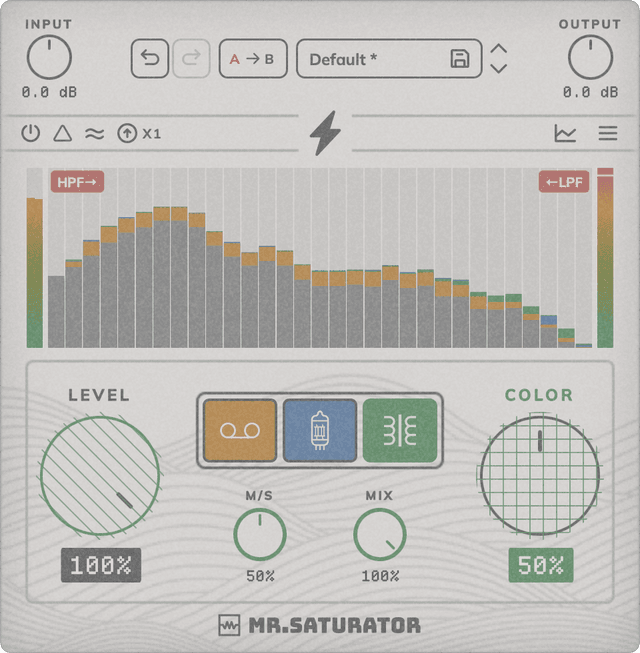
Mr.Saturator is split into three independent saturators (Tape, Tube, Transformer) that process in parallel, plus a global section with filters, oversampling and gain controls.
Tape / Tube / Transformer (Enable): Toggles each saturator independently. The three can run in parallel, blended through their own Mix controls.
HPF→←LPF
HPF / LPF: High-pass and low-pass filters (SVF) that limit the band where saturation acts. Signal outside that range stays clean.
Input / Output Gain: Input gain to drive the saturation stage harder, and output gain to make up the resulting level.
Boost: Drives the Color stage with extra intermodulated harmonics for a more aggressive, creative character.
Oversampling: Raises the internal sample rate (x1, x2, x4 or x8) to reduce aliasing introduced by saturation.
RMS Match: Matches the output RMS to the input so you can A/B the effect without level differences.
Delta: Monitor mode that plays only the difference between input and processed signal — useful to hear exactly what the plugin adds.
Bypass: Disables processing while keeping latency compensated for click-free A/B.
Chart type: The bars/curve icon above the graph toggles two visualization modes: Bars (third-octave style analyzer) and Curve (smoothed spectral curve). It doesn't affect the sound — visual only.
Menu: Click the hamburger icon (top right) to open the menu: Theme (Classic / Dark) switches the UI palette; Resize (75 / 100 / 125%) scales the plugin window; Help opens Website, Support, About and License.
Level (per saturator)
Controls the amount of saturation applied by each mode. The higher the level, the more harmonics and natural compression.
Color (per saturator)
Shapes the harmonic balance of each saturator. Lets you fine-tune the character of each stage independently.
Mix (per saturator)
Wet/dry blend for that specific mode. Lets you dose each saturator in the parallel sum.
M/S (per saturator)
Mid/Side balance per saturator: 0% processes only Mid, 50% full stereo, 100% only Side.
How Mr.Saturator saturates
Mr.Saturator offers three saturation modes, each with its own character. Tape smooths the odd harmonics (T3 and T5) with an internal low-pass filter — the classic magnetic tape signature. Tube adds even harmonics (T2, T4, T6) on top of the odd ones, like a single-ended valve stage. Transformer combines odd Chebyshev terms with a Color-biased saturation that behaves like a saturating transformer — more drive as Color rises. The lightning button (Color Boost) adds an extra saturation stage with an envelope-dependent asymmetric bias: it pushes more harmonics overall, extends the series above the 7th and especially reinforces the 2nd — the sound becomes more "single-ended" and aggressive as you raise Color.
Presets
Mr.Saturator ships with factory presets to get you started. You can also save your own settings and organise them by category.
System Requirements
- Formats: VST3, AU (64-bit)
- Platforms: macOS 10.13+ (64-bit, including Intel and Apple Silicon) — AAX and Windows coming soon
- No iLok required
- Works with all major DAWs, including Ableton Live, Logic Pro, GarageBand, FL Studio, Cubase, Studio One, Reason, Reaper, Bitwig Studio ...