Mr.Spectrum
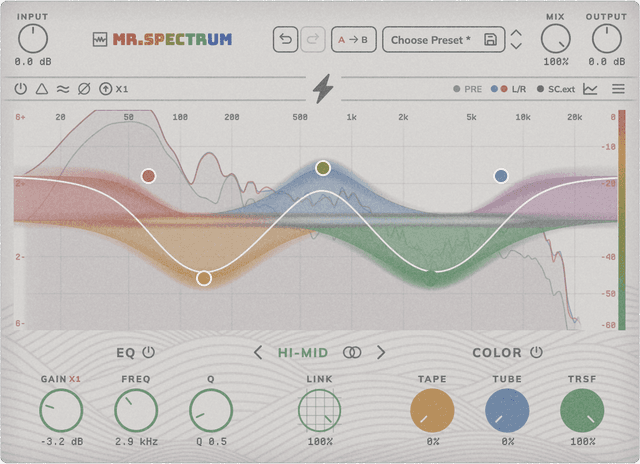
Mr.Spectrum plugin — 5-band parametric EQ with analog saturation per band.
Introduction
Mr.Spectrum is a 5-band parametric equalizer with the option to add three analog saturation modes — Tape, Tube and Transformer — per band. Bands 1 and 5 can act as Peak, Shelf or Pass filters with selectable slope. It includes Linear Phase mode, per-band Mid/Side control, oversampling for the saturation stage, RMS gain match and a Delta monitor.
Installation
- Download the installer from the plugins page.
- Run the installer, select this plugin and follow the on-screen instructions.
- Open your DAW and find Mr.Spectrum in the plugin list (VST3 / AU).
- Insert Mr.Spectrum on the desired channel's effects chain.
Interface
The interface is built around the spectrum analyzer and the EQ curve, with independent controls per band and a global section for gain, mix and quality.
5 parametric bands: Each band has independent Gain (±dB), Frequency (Hz) and Q controls. Bands 2, 3 and 4 are Peak type. Bands 1 and 5 can switch type.
Band 1 / Band 5 Type: Band 1 can be Peak, Low Shelf or High Pass. Band 5 can be Peak, High Shelf or Low Pass. Useful to clean up edges or shape the overall spectrum.
6dB12dB18dB24dB
Band 1 / Band 5 Slope: Pass filter slope for bands 1 and 5 (6, 12, 18 or 24 dB/oct) when used as High Pass or Low Pass.
2× click
Band On: Toggles a whole band (its EQ and its saturation) by double-clicking its node on the curve, without losing the settings.
/ 2× clickS
Band Solo: Hovering a node reveals a toolbar with a headphones icon: press and hold to monitor the band while held, or double-click to latch the solo (click again to release). Useful to fine-tune Q and frequency.
EQCOLOR
EQ On / Sat On (per band): Toggles the EQ or the saturation of the active band independently with their power buttons, without losing the settings.
Per-band saturation (Tape / Tube / Trsf): Each band can add independent Tape, Tube and Transformer saturation with separate amounts. The saturation is applied only within that band's range.
Boost: Pushes the saturation stage with extra intermodulated harmonics for a more aggressive character.
Sat Link EQ: Picks what signal feeds the band's saturation: at 0% it saturates the original signal (pre-EQ), at 100% it saturates the EQ'd signal, and intermediate values blend the two. LETS YOU DECIDE WHETHER THE EQ AFFECTS THE SATURATION.
Per-band M/S: Mid/Side balance per band: lets you apply EQ + saturation to the center, sides, or anything in between.
Quality EQ: Switches between Zero Latency (real-time) and Linear Phase (no inter-band phase shift, ideal for mastering).
X2
EQ x2 Range: Doubles each band's gain range for more extreme boosts or cuts.
Sat Oversampling: Increases the internal sample rate of the saturation (x1, x2, x4 or x8) to reduce aliasing when driving hard.
Input / Output Gain: Input gain to drive the plugin, and output gain to make up the resulting level.
Mix: Global wet/dry mix between the original signal and the processed one (EQ + saturation).
RMS Match: Matches output RMS to input for clean A/B comparisons without level differences.
Delta: Monitor that plays only the difference between the clean and processed signal — useful to hear exactly what the plugin is doing.
Bypass: Disables processing with compensated latency for clean A/B switching.
Analyzer menu: The chevron icon above the analyzer opens a menu with Speed (Low / Medium / High — analyzer response time), Range (60 / 90 / 120 dB — vertical range) and Tilt (0 / 1.5 / 3 / 4.5 / 6 dB/oct — spectral tilt). Above the graph, the PRE, M/S and SC.ext labels toggle which signals are drawn: pre-EQ, mid/side and external sidechain.
Menu: Click the hamburger icon (top right) to open the menu: Theme (Classic / Dark) switches the UI palette; Resize (75 / 100 / 125%) scales the plugin window; Help opens Website, Support, About and License.
How Mr.Spectrum works
Mr.Spectrum is a linear-phase 5-band equalizer with optional per-band saturation. Being linear-phase, it introduces no phase distortion: transients and stereo image stay intact, ideal for mastering and surgical correction. Each of the 5 bands can engage saturation in one of the three Mr.Saturator modes (Tape, Tube, Transformer) — plus the lightning button (Color Boost) that adds an extra saturation stage with asymmetric bias, pushing more harmonics overall and reinforcing the 2nd. The EQ-link control decides which signal feeds the saturation stage: at 0% it saturates the clean signal (independent of the EQ); at 100% it saturates the signal already processed by the EQ. This opens a powerful use case: cut a resonance with a narrow filter and, with low EQ-link, let the saturation refill that hole with harmonics from the chosen mode — you keep body and color where the EQ took energy out.
Presets
Mr.Spectrum ships with factory presets to get you started. You can also save your own settings and organise them by category.
System Requirements
- Formats: VST3, AU (64-bit)
- Platforms: macOS 10.13+ (64-bit, including Intel and Apple Silicon) — AAX and Windows coming soon
- No iLok required
- Works with all major DAWs, including Ableton Live, Logic Pro, GarageBand, FL Studio, Cubase, Studio One, Reason, Reaper, Bitwig Studio ...