Mr.Warmer Manual
Mr.Warmer plugin — saturation and musical frequency enhancement.
Introduction
Mr.Warmer is an audio plugin that "fattens" your mixes through saturation color and musical frequency enhancement. Designed for the final mastering stage, it offers Tilt EQ and Mid/Side mode.
Installation
- Download the installer from the plugins page.
- Run the installer, select this plugin and follow the on-screen instructions.
- Open your DAW and find Mr.Warmer in the plugin list (VST3 / AU).
- Insert Mr.Warmer on the desired channel's effects chain.
Interface
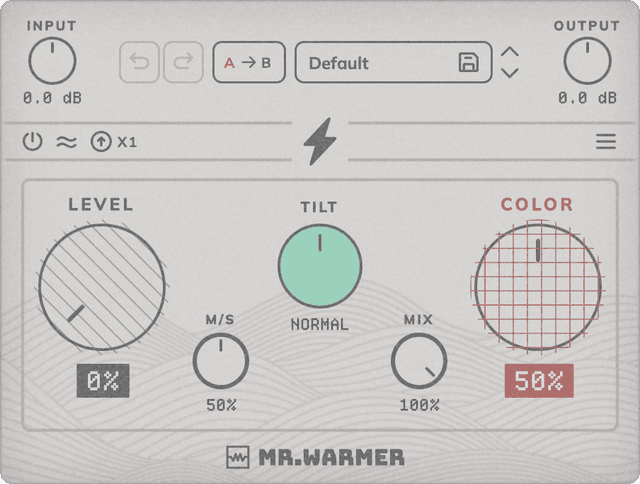
Mr.Warmer's interface is designed to be intuitive and straightforward.
Level: Controls the overall signal level of the saturator. As you increase this parameter, even and odd harmonics are gently applied to the signal, resulting in a natural and pleasing compression.
Color: Controls the weight and energy of the harmonics applied to the signal. Turn it up for a warmer, thicker sound.
Tilt: Adjusts the tonal balance of the signal before the saturator, tilting from warm lows to silky highs. Pre-saturator TILT EQ.
Mix: Blends between the original (dry) and processed (wet) signal. 100% = fully processed.
Mid / Side: Controls where saturation is applied using a percentage: 0% processes only Mid (center), 50% processes full stereo, and 100% processes only Side (laterals).
Color Boost: Adds a boost to the "Color" processing stage, applying more intermodulated harmonics between each other for a more powerful saturation. Ideal for creative processing where you want to push the character further.
In / Out: Adjusts the input level, applying more gain to add more energy to the saturation stage, and the output level if you want to compensate for the volume increase.
Oversampling: Increases the internal sample rate (x1, x2, x4 or x8) for higher quality harmonic processing and reduced aliasing.
Gain Unity: Automatically compensates the volume increase caused by saturation, so A/B bypass stays at equal loudness.
Bypass: Disables processing while keeping latency compensated for click-free A/B comparison.
Menu: Click the hamburger icon (top right) to open the menu: Theme (Classic / Dark) switches the UI palette; Resize (75 / 100 / 125%) scales the plugin window; Help opens Website, Support, About and License.
How Mr.Warmer saturates
Mr.Warmer combines Chebyshev polynomials (T2–T7) weighted by Level and Color. Level sets the global magnitude of the harmonics, anchored on the 3rd (odd) — the signature of symmetric distortion. Color adds the even harmonics (2nd, 4th, 6th), characteristic of asymmetric stages like single-ended tubes or saturated transformers, and also reinforces the odd ones. The lightning button (Color Boost) adds an extra saturation stage with an envelope-dependent asymmetric bias: it pushes more harmonics overall, extends the series above the 7th and especially reinforces the 2nd — the sound becomes more "single-ended" and aggressive as you raise Color.
Presets
Mr.Warmer includes factory presets ready to use. You can also save and load your own presets for quick access to your favorite settings.
System Requirements
- Formats: VST3, AU (64-bit)
- Platforms: macOS 10.13+ (64-bit, including Intel and Apple Silicon) — AAX and Windows coming soon
- No iLok required
- Works with all major DAWs, including Ableton Live, Logic Pro, GarageBand, FL Studio, Cubase, Studio One, Reason, Reaper, Bitwig Studio ...